Digital Estate Planning Guide

My Digital Life
— The Guide

Everything someone would need to manage your digital life if you couldn't.

A 17-section fillable guide that organizes your devices, accounts, passwords, smart home, subscriptions, photos, and legacy wishes — so a trusted person can step in without guesswork.

17
Sections
Fillable
PDF + DOCX
Instant
Download
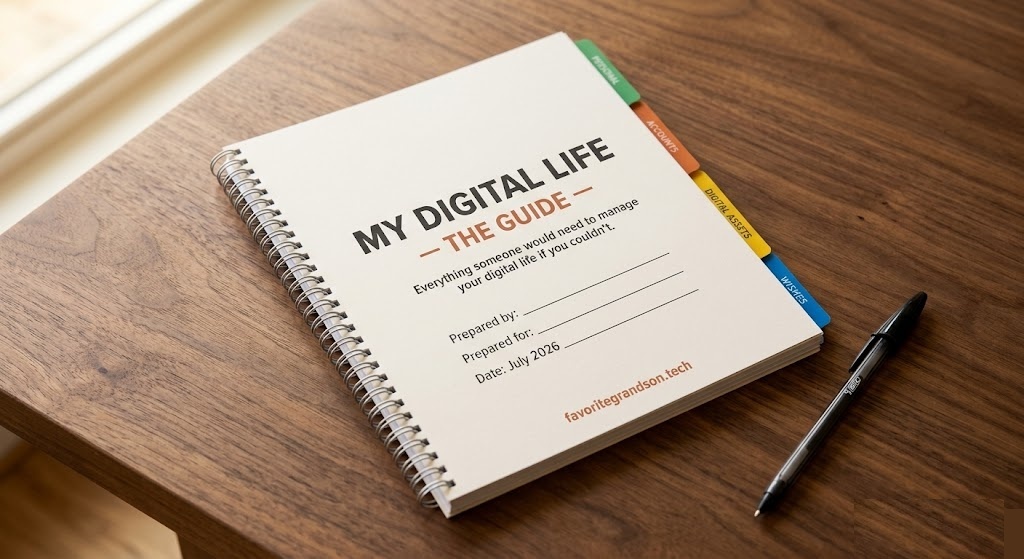
COVER PAGE
My Digital Life
— The Guide
Everything someone would need to
manage your digital life if you couldn't.
Prepared by:
Prepared for:
Date:
FG Favorite Grandson

The First Wall Your Family Will Hit

When someone is incapacitated or passes away, their family doesn't start with the will. They start with the phone. The PIN. The laptop password. The 2FA codes. The smart home that's tied to a dead person's account. The subscriptions silently draining $200/month for six months.

Every "end-of-life planner" on the market skips these. They give you blank lines for passwords from a 2018 template. The Guide was built for how people actually live digitally in 2026.

What's Inside

17 sections. Nothing generic. Everything actionable.

📱
Devices

Phone, laptop, tablet PINs & passwords. Smart home devices. The first thing anyone needs.

📧
Email — The Master Key

Primary email & recovery options. Password reset for everything flows through here.

🔐
Passwords & 2FA

Password manager setup or written fallback. 2FA backup codes. Authenticator app access.

🏦
Financial Accounts

Banking, credit cards, investment accounts, crypto. Access instructions without exposing secrets prematurely.

💳
Subscriptions Audit

Every recurring charge mapped. Cancellation instructions. Prevent $200/mo from draining unnoticed.

🖼️
Photos & Cloud Storage

Where photos actually live — iCloud vs Google Photos vs external drive. Backup status.

🔑
Important Accounts

Apple ID / Google / Samsung ecosystem keys. Social media. Online presence & memorialization wishes.

🏠
Smart Home

Thermostat, cameras, door locks, speakers. All tied to accounts that need transfer.

🏥
Healthcare Portals

Insurance, patient portals, prescriptions. 2 full pages dedicated to medical access.

🆘
Recovery & Emergency

2FA backup codes. Emergency contacts. Tech Power of Attorney designation. 2 full pages.

📋
6-Month Review

Accountability log. Because this isn't a one-and-done document — it's a living system.

💌
"If You Are Reading This"

An emotional entry letter. Warm, human, reassuring. Sets the tone for whoever opens this.

+ Modular add-on pages for extra devices and smart home gear

Why The Guide Is Different

Every competitor copies the same 2018 template. The Guide fills every gap.

Other planners skip device access

They ask for passwords. They don't ask for phone PINs, laptop logins, or tablet access — the literal first wall a family hits.

Zero competitors mention 2FA or legacy contacts

Apple, Google, and Facebook all have formal legacy contact processes. Not one competitor mentions them. The Guide walks through all three.

Smart home? Subscription drain? Not covered.

Thermostats, cameras, and door locks tied to a deceased person's account. Subscriptions silently draining. The Guide has dedicated sections for both.

Cold, legal tone vs. warm, human voice

Most planners feel like a will — sterile and intimidating. The Guide opens with an emotional letter and uses warm, clear language throughout. It feels like something family made for you.

🧑‍💻

For yourself

Peace of mind that your partner or family won't be locked out and guessing. 60 minutes to fill out. Years of reassurance.

👨‍👩‍👧

For your parents

The conversation starter you've been avoiding. Give them the Guide. Offer to help fill it out. No more guessing their iPhone PIN.

🎁

As a gift

The most practical gift nobody thinks to give. Wedding, new parent, retirement, estate planning — the Guide fits every life transition.

Get the Guide

Instant download. Fillable PDF + editable DOCX. One purchase, use forever.

Digital Download
$25

One-time purchase. No subscription.

  • Fillable PDF — type directly in the fields, save, print
  • Standard PDF — print and handwrite
  • Editable DOCX — customize, add pages, make it yours
  • 17 sections — every digital corner of your life covered
  • Modular add-on pages — extra device & smart home slots
  • Lifetime access — buy once, use forever, re-download anytime

Secure payment via PayPal

You'll receive the download link immediately after payment. Questions? help@favoritegrandson.tech

Not satisfied? Email within 30 days for a full refund. No questions asked.

Questions

Is this a physical book or a digital download?

Digital download. You get a fillable PDF (type directly in the fields), a standard PDF (print and handwrite), and an editable DOCX (customize however you want). No physical product is shipped.

Can I fill this out for someone else?

Absolutely — and we encourage it. Many people buy the Guide for their parents or partner, then help them fill it out together. It's a natural conversation starter for a topic that's hard to bring up.

What if I'm not technical?

The Guide was designed for exactly that. It uses warm, clear language — no jargon, no assumptions. Each section explains why it matters before asking you to fill anything in. If you get stuck, Favorite Grandson sessions are available for personalized help.

How is this different from a will or estate planner?

A will covers legal and financial assets. The Guide covers your digital life — the devices, accounts, passwords, and access paths your executor will need immediately. They're complementary. Most families hit the digital wall long before they get to the will.

Can I get a refund?

Yes. If the Guide isn't what you expected, email us within 30 days for a full refund. No questions, no hassle.

Don't leave your family guessing.

60 minutes now saves them days of frustration and thousands in lost subscriptions later.

Get the Guide — $25